

WordPress Capabilities allows you to set personalized access levels for users
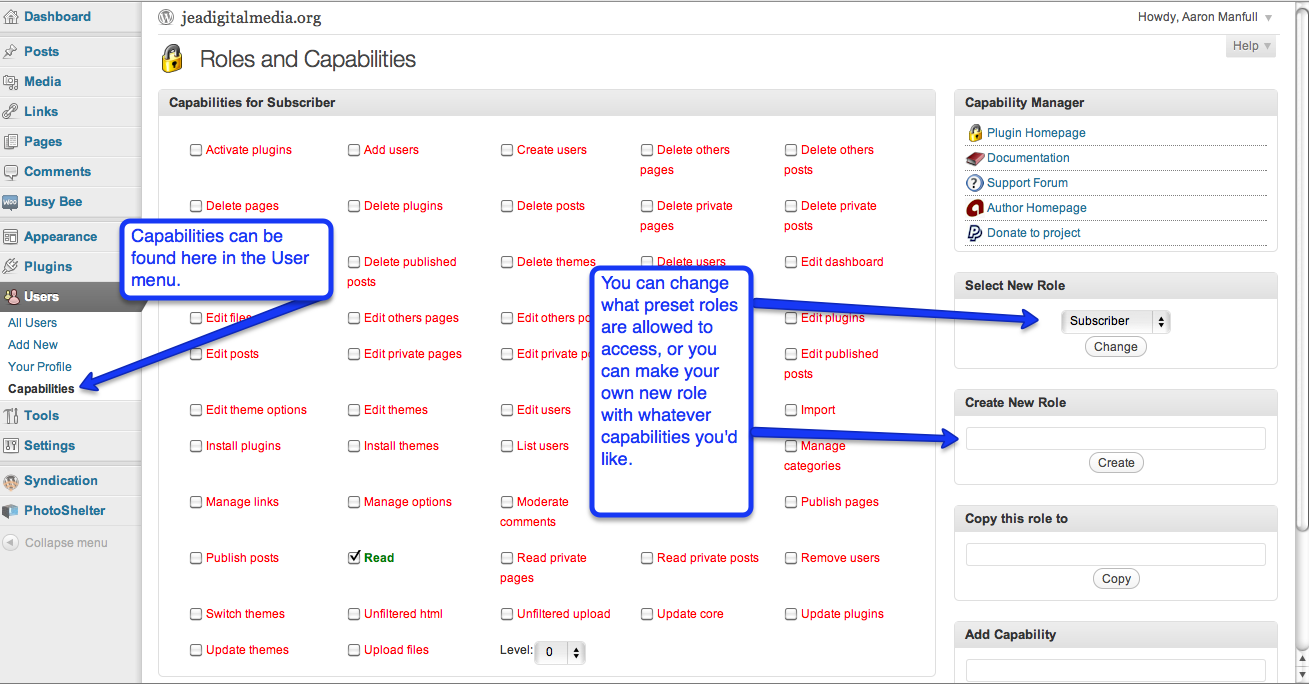
I posted a week or so ago a handout that explained the different User levels (Administrator, Contributor, Author, etc.) on WordPress. If you find that those preset user roles aren’t exactly what you want, no worries, Capabilities allows you to set whatever permissions you want.
You can find Capabilities under the Users menu. There, you can make changes to the preset roles, or even create your own unique user level, name it what you want, and give it the specific permissions you want it to have.


Very useful. Last year, I had to bump all my staff to Editor level versus contributor level because contributors weren’t allowed to upload images. I like this.
Is this the plugin that is tied to?
http://wordpress.org/extend/plugins/capsman/
Capabilities are actually built in to WordPress 3.2 update. You should see them in the User menu.
We’re running 3.2 but I don’t see Capabilities under the Users menu. It doesn’t appear that anything has changed. Advice?
Jill – have you upgraded to 3.2.1? If you have the most recent version of WordPress it should be the fourth item under the “User” drop-down menu. If you have still can’t find it, let me know.
great issues altogether, you just won a new reader.
What could you suggest in regards to your post that you simply made a few days ago?
Any positive?
Aaron,
I have wordpress 3.4.1
I do not see the list of capabilities under my user tab.
Was this feature removed in more recent versions of wordpress?
Thx
Go ahead and install the plugin “User Role Editor” and that should allow you to do the same thing. Things have changed since that post was made. Let me know if this.
thx… I was looking at this plugin earlier and found it to be comprehensive.
I will download it and give it a try.
Thanks for the wonderful advice and helpful tips on your site.
D